

Barco ClickShare CX Models Comparison
Choose the Perfect Wireless Conferencing Solution for Your Meeting Room
CX-20 vs CX-30 vs CX-50 vs CX-50 Gen 2 – Complete Guide
What is Barco ClickShare?
Understanding Wireless Conferencing Systems
Seamless Wireless Collaboration
Barco ClickShare is a wireless conferencing system that allows users to connect their laptops to meeting room cameras, microphones, and displays without cables. Instead of complex setups, it enables:
- One-click wireless presentation
- BYOD (Bring Your Own Device) compatibility
- Seamless use with platforms like Zoom and Microsoft Teams
- Instant collaboration without technical delays
💡 Key Insight: This makes it a preferred solution for modern meeting rooms where speed and simplicity matter.
Barco ClickShare CX Models Overview
Each model is designed for specific meeting room sizes and collaboration needs
Entry Level
CX-20
Wireless Conferencing for Huddle Rooms
- Small meeting rooms & huddle spaces
- Single screen sharing
- 1 ClickShare button
- Quick & simple meetings
Best For: Teams that need basic wireless conferencing without complex AV setups
Professional
CX-30
Wireless Conferencing for Medium Meeting Rooms
- Medium-sized meeting rooms
- 2 buttons for collaboration
- Annotation & touchback features
- Smoother team discussions
Best For: Daily team meetings that require interaction and collaboration
Enterprise
CX-50
High-Performance Conferencing for Boardrooms
- Large meeting rooms & boardrooms
- Dual screen display
- Advanced AV integration
- High-impact presentations
Best For: Organizations relying on high-quality video and multi-screen collaboration
Latest Technology
CX-50 Gen 2
Future-Ready Wireless Conferencing System
- Enhanced performance & faster processing
- USB-C connectivity with flexibility
- Advanced security features
- Enterprise-grade reliability
Best For: Enterprises needing secure, scalable, and future-ready meeting room solutions
ClickShare CX Models Comparison Table
Complete feature breakdown across all Barco Clickshare models.
| Feature | CX-20 | CX-30 | CX-50 | CX-50 Gen 2 |
| Room Type | Small / Huddle | Medium | Large / Boardroom | Enterprise |
| Number of Buttons | 1 | 2 | 2 | 2 |
| Screen Support | Single | Single | Dual | Dual |
| Simultaneous Sharing | 1 | 2 | 2 | 2 |
| Interactivity Features | ✖ | ✔ | ✔ | ✔ |
| Wired Input (HDMI/USB-C) | ✖ | ✖ | Limited | ✔ |
| Video Resolution | HD | HD | 4K | 4K+ |
| BYOD Support | ✔ | ✔ | ✔ | ✔ |
| Enterprise Security | ✔ | ✔ | ✔ | ✔✔ |
📌 Note: This comparison is based on official product positioning and feature sets from Barco documentation. Specifications may vary by region.
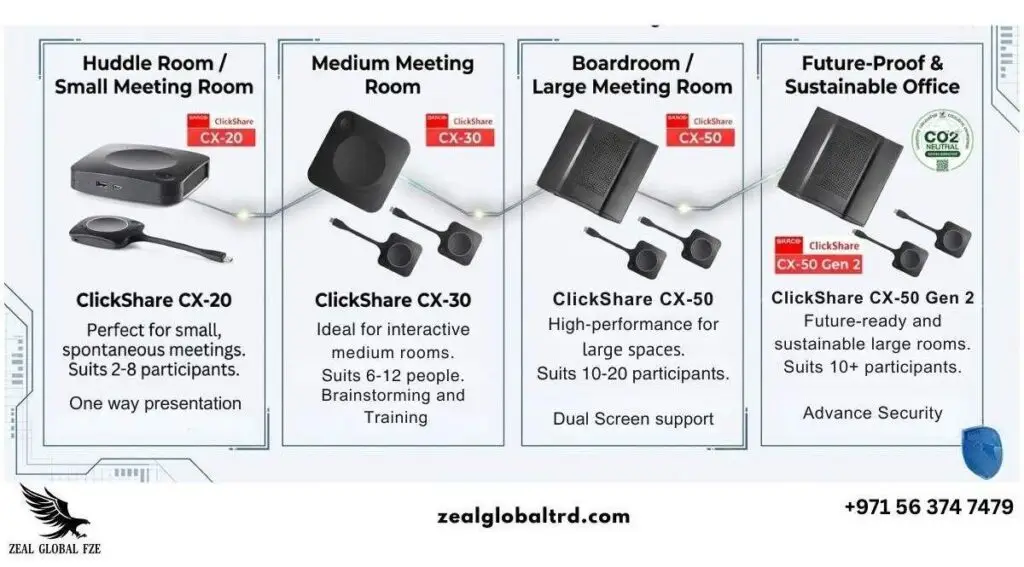
Key Differences Between ClickShare CX Models
Feature Breakdown & Detailed Analysis
Room Size & Use Case Comparison
Choosing the right model starts with your meeting room size:CX-20
Best for 2–4 users in small huddle rooms. Ideal for quick stand-ups and informal meetings.
CX-30
Ideal for 4–10 users in medium meeting rooms. Perfect for daily team collaboration.
CX-50
Designed for 10–25 users in boardrooms. Suited for high-stakes presentations.
CX-50 Gen 2
Built for enterprise-level high-impact meeting spaces with advanced requirements.
⚠️ Important: Selecting the wrong size can lead to poor performance or underutilization of features.
AV Performance & Display Capabilities
CX-20
Supports standard HD video, suitable for everyday meetings with basic display needs.
CX-30
Supports standard HD video, suitable for everyday meetings with interactive features.
CX-50
Offers 4K resolution and dual screen output for professional presentations.
CX-50 Gen 2
Improves video clarity and processing performance with enhanced 4K+ capabilities.
💡 Recommendation: If presentations and client meetings are critical, CX-50 or Gen 2 is the better choice.
Collaboration & Interactivity Features
CX-20
Basic wireless sharing – One-way presentation without interactive features.
CX-30 & CX-50
Include: Annotation, Touchback, Interactive collaboration for brainstorming and training.
CX-50 Gen 2
Enhanced interactivity with advanced collaboration tools and real-time engagement features.
✔ Use Cases: These features are useful for brainstorming, training, and hybrid meetings.
Connectivity & Integration (BYOD + Wired Options)
All models support BYOD – Users can connect laptops wirelessly to any ClickShare system.
CX-20 & CX-30
Wireless-only connectivity. Perfect for modern BYOD environments.
CX-50
Limited wired input options for legacy AV systems integration.
CX-50 Gen 2
Supports HDMI and USB-C wired input with better integration for existing AV systems.
🔌 Important: This is crucial for businesses with complex AV setups and legacy equipment integration.
Security, Scalability & IT Control
Enterprise-grade security across all models:
- Cloud-based device management (XMS)
- Regular updates and encryption protocols
- Compliance with industry standards
CX-50 Gen 2 adds:
- Stronger security layers
- Better long-term scalability
- Enhanced compliance features
- Future-proof architecture
🔒 Industries: Ideal for finance, healthcare, and corporate enterprises requiring strict security compliance.
Room Size & Use Case Comparison
Choosing the right model starts with your meeting room size:
CX-20
Best for 2–4 users in small huddle rooms. Ideal for quick stand-ups and informal meetings.
CX-30
Ideal for 4–10 users in medium meeting rooms. Perfect for daily team collaboration.
CX-50
Designed for 10–25 users in boardrooms. Suited for high-stakes presentations.
CX-50 Gen 2
Built for enterprise-level high-impact meeting spaces with advanced requirements.
⚠️ Important: Selecting the wrong size can lead to poor performance or underutilization of features.
AV Performance & Display Capabilities
CX-20
Supports standard HD video, suitable for everyday meetings with basic display needs.
CX-30
Supports standard HD video, suitable for everyday meetings with interactive features.
CX-50
Offers 4K resolution and dual screen output for professional presentations.
CX-50 Gen 2
Improves video clarity and processing performance with enhanced 4K+ capabilities.
💡 Recommendation: If presentations and client meetings are critical, CX-50 or Gen 2 is the better choice.
Collaboration & Interactivity Features
CX-20
Basic wireless sharing – One-way presentation without interactive features.
CX-30 & CX-50
Include: Annotation, Touchback, Interactive collaboration for brainstorming and training.
CX-50 Gen 2
Enhanced interactivity with advanced collaboration tools and real-time engagement features.
✔ Use Cases: These features are useful for brainstorming, training, and hybrid meetings.
Connectivity & Integration (BYOD + Wired Options)
All models support BYOD – Users can connect laptops wirelessly to any ClickShare system.
CX-20 & CX-30
Wireless-only connectivity. Perfect for modern BYOD environments.
CX-50
Limited wired input options for legacy AV systems integration.
CX-50 Gen 2
Supports HDMI and USB-C wired input with better integration for existing AV systems.
🔌 Important: This is crucial for businesses with complex AV setups and legacy equipment integration.
Security, Scalability & IT Control
Enterprise-grade security across all models:
- Cloud-based device management (XMS)
- Regular updates and encryption protocols
- Compliance with industry standards
CX-50 Gen 2 adds:
- Stronger security layers
- Better long-term scalability
- Enhanced compliance features
- Future-proof architecture
🔒 Industries: Ideal for finance, healthcare, and corporate enterprises requiring strict security compliance.
CX-50 vs CX-50 Gen 2: What's New and Why It Matters
Understanding the Next Generation of Wireless Conferencing
⚡ Performance Upgrades
- Faster processing
- Better video scaling
- Improved system responsiveness
🔒 Enhanced Security
- Stronger encryption
- More frequent security updates
- Better compliance for sensitive environments
♻️ Sustainability & Future-Proof
- Lower power consumption
- Eco-friendly design
- Built for long-term usage
💡 Investment Perspective: CX-50 Gen 2 is not just an upgrade. It is a long-term investment in your organization’s communication infrastructure.
Which ClickShare Model is Right for Your Meeting Room?
Quick Decision Guide
Best for Huddle Rooms
CX-20
- Simple setup
- Cost-effective
- Ideal for quick meetings
- 2-4 person capacity
Best for Medium Meeting Rooms
CX-30
- Interactive features
- Better collaboration
- Balanced performance
- 4-10 person capacity
Best for Large Conference Rooms
CX-50
- Dual screen support
- High-quality AV
- Suitable for presentations
- 10-25 person capacity
Best for Enterprise & Future-Ready Setups
CX-50 Gen 2
- Advanced security
- Future-proof technology
- Best for large organizations
- Enterprise-grade reliability
Benefits of Using Barco ClickShare for Wireless Conferencing
Why organizations choose ClickShare
🔌
No Cables or Setup Delays
Connect instantly without fumbling with cables or adapters
📱
Works with Existing Devices
BYOD compatible with all major operating systems
🌐
Supports Hybrid Meetings
Seamlessly integrate remote and in-person participants
👥
Easy to Use
No training required – intuitive one-click operation
📈
Improves Productivity
Reduces friction in meetings and improves collaboration instantly
🔒
Enterprise Security
Encryption and compliance features for sensitive data
✓ Bottom Line: It reduces friction in meetings and improves collaboration instantly, making it an essential tool for modern workplaces.
Ready to Transform Your Meeting Rooms?
Get expert guidance on choosing the right ClickShare model for your organization
Frequently Asked Questions
Common questions about Barco ClickShare models
CX-20 is ideal for small teams and huddle rooms. It offers simple setup, cost-effectiveness, and is perfect for quick meetings with 2-4 participants. If you need more interactive features, consider the CX-30 for slightly larger teams.
Yes. All ClickShare models support major conferencing platforms through BYOD (Bring Your Own Device). Users can connect their laptops running Zoom, Microsoft Teams, Google Meet, or any other platform wirelessly to the ClickShare receiver.
Gen 2 offers:
- Better performance and faster processing
- Stronger security and encryption
- Improved connectivity (USB-C & HDMI)
- Future-proof investment
Yes. All ClickShare models include enterprise-grade encryption and IT management tools. The CX-50 Gen 2 offers enhanced security features, making it ideal for industries like finance, healthcare, and corporate enterprises with strict compliance requirements.
Yes, especially with the CX-50 and CX-50 Gen 2 models which offer wired input options (HDMI and USB-C). The CX-50 Gen 2 provides the best integration capabilities for complex AV systems. All models support wireless integration with modern meeting room setups.
Deployment timelines vary based on your setup complexity. Simple installations can be completed in days, while enterprise deployments with multiple rooms and complex AV integration may take weeks. Our team at Zeal Global can provide a customized timeline based on your specific requirements.
We provide comprehensive post-installation support including technical assistance, device management through Barco’s XMS cloud platform, regular updates, and troubleshooting. Our team is available to help ensure your ClickShare systems perform optimally.
Barco ClickShare Solutions in UAE
Choosing the Right Partner for Your Implementation
Selecting the right model is only part of the process. Proper installation and integration are equally important. A professional AV partner helps with:
🏗️ Meeting Room Design
Expert consultation on optimal room layout and equipment placement for maximum collaboration
🔧 Device Integration
Seamless integration with your existing cameras, microphones, displays, and AV systems
⚙️ Installation & Configuration
Professional installation with proper cabling, network setup, and system configuration
📞 Ongoing Support
Continuous technical support, maintenance, and updates to ensure optimal performance
✓ Why It Matters: This ensures your investment delivers real performance and maximizes ROI for your organization.
Upgrade Your Meeting Rooms with the Right ClickShare Solution
Choosing between CX-20, CX-30, CX-50, and CX-50 Gen 2 depends on room size, collaboration needs, AV complexity, and security requirements. Getting expert guidance helps you avoid costly mistakes.