

Yealink MeetingBar A40 vs A30: Which Should You Buy for Your Office?
Two Yealink bars, the same room size, the same price bracket, and somehow, procurement teams still end up going back and forth for a week before deciding. That’s not surprising. The Yealink A30 and Yealink A40 MeetingBar fall squarely into Yealink’s medium room solution lineup, built for spaces seating roughly 6 to 12 people, both run Teams and Zoom natively, and both promise “AI-powered” everything. On paper, they look like twins.
So why does the A40 exist if the Yealink MeetingBar A30 is already successful?
The answer goes far beyond megapixels or software versions.
The real difference lies in how each device fits your business over the next five years.
One is built on a chipset from 2019. The other launched in September 2024 with a completely different camera philosophy. If you’re an IT manager in Dubai sizing up a boardroom, or an operations lead trying to standardize 15 meeting rooms across a UAE office, that gap matters more than the spec sheet suggests.
We’ll walk through what each bar is actually good at and where it falls short.
By the end, you’ll know exactly which MeetingBar makes the most sense for your meeting rooms.
What Actually Changed from the A30 to the A40?
Before looking into specs, it helps to know what Yealink was actually solving for when it built the A40. This wasn’t a minor refresh, it’s a different generation of hardware built two years apart.
The A30 (Launched 2022)
Built around a proven formula: dual 8MP cameras, real optical zoom, and Yealink’s earlier noise-proof audio engine, all running on a Snapdragon 845 chipset with Android 9/10. It’s mature technology with a solid track record.
The A40 (Launched 2024)
Rebuilt from the ground up: dual 48MP sensors, newer Android 13 platform under Yealink’s MDEP architecture, and advanced AI Noise Cancellation Pro for noisier modern offices.
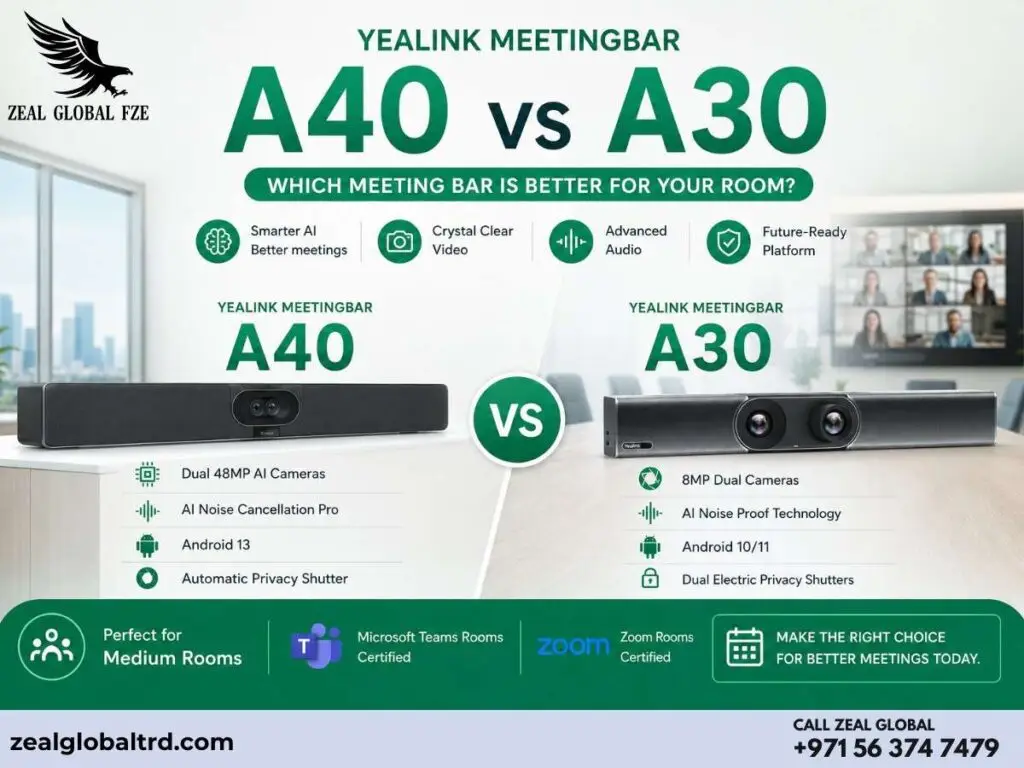
Quick Comparison: Yealink A30 vs A40 at a Glance
| Feature | Yealink A30 2022 | Yealink A40 2024 |
|---|---|---|
| Operating System | Android 9/10, Snapdragon 845 | Android 13, MDEP Platform |
| Camera Setup | 8MP wide + 8MP telephoto | Dual 48MP cameras |
| Zoom | 10× Hybrid Zoom (3.5× optical + 3× digital) | Digital zoom with AI reframing |
| Field of View | 120° wide + telephoto lens | 120° ultra-wide (dual 78° combined) |
| Microphones | 8 MEMS microphone array, 6m pickup | 8 MEMS microphone array, 6m pickup, AI Noise Suppression Pro |
| Privacy | Electric privacy shutter | Automatic privacy shutter |
| Ideal Room Size | Medium rooms (6–12 people) | Small to medium rooms (6–11 people) |
| Best Touch Console | CTP18 (10.1″) | CTP25 (8″) |
Worth noting: both bars sit in roughly the same price bracket once you add a touch console, so the deciding factor usually isn’t budget on paper, it’s what you actually need out of the camera in a medium room and how long you want the bar to stay supported.
Understanding the Differences
The Camera Showdown: Optical Zoom vs Raw Megapixels
Yealink MeetingBar A30 Optical Zoom
The A30 counters with something the A40 doesn’t have: a true 3.5x optical zoom lens (10x hybrid with digital zoom stacked on). Independent hands-on reviews specifically called out how well the telephoto lens locks onto active speakers without losing detail.
Best for:
- Long, narrow boardrooms
- Rooms with people seated far from camera
- Situations requiring sharp detail at distance
Yealink MeetingBar A40 High Resolution
The A40’s dual 48MP lenses give it far more raw resolution to work with. In practice, that means sharper close-ups, better performance in mixed lighting, and enough detail for the camera’s AI to crop into a “digital zoom” without the image falling apart.
Best for:
- Wide, square rooms
- Hybrid interviews with facial expressions
- Whiteboard capture and detail
Audio Intelligence: Where the A40 Pulls Ahead
Both bars use an 8-MEMS microphone array with a 6-metre pickup range, so on paper the numbers match. The difference is in what happens to the sound after it’s picked up.
Yealink A30: Noise-Proof Technology
Reduces distracting sounds like keyboard clatter, mouse clicks, and footsteps using a deep-learning sound database. Genuinely good for its generation.
Yealink A40: AI Noise Cancellation Pro
Adds advanced full-duplex audio, a step beyond blocking static background noise. Built to isolate the conference table itself, filtering out glass-wall reflections, hallway chatter, and the “office soup” sound that plagues open-plan offices with glass partitions.
If your meeting room shares a wall with an open workspace or another glass-partitioned room, the A40’s audio fence is the more relevant upgrade.
Software Lifecycle: Why Android 13 Is a Bigger Deal
The A40 runs on Android 13 under Yealink’s Microsoft Device Ecosystem Platform (MDEP) architecture. The A30 runs on an older Android 9/10 build powered by a Qualcomm Snapdragon 845 chipset, solid, proven silicon, but a generation behind.
Yealink MeetingBar A30 Implications
- Shorter security patch window
- Newer app updates may not be available
- Proven, stable platform
Yealink MeetingBar A40 Advantages
- Years more security patches ahead
- Longer app update support
- Better for 4-5 year deployments
Which Meeting Bar Gives You Better Value for Money?
Let’s address the question every buyer eventually asks.
Is the newer Yealink MeetingBar A40 worth choosing over the A30?
At first glance, many buyers naturally compare the purchase price. That’s understandable.
But when you’re investing in meeting room technology, the initial price is only one part of the equation.
A better question is:
Which product will deliver the lowest cost of ownership over the next five years?
That includes:
- Software support
- Maintenance
- User adoption
- IT support time
- Employee productivity
- Future upgrades
A meeting bar that saves just five minutes in every meeting can surprisingly recover its cost because bad meetings drain productivity and profits.
That’s why evaluating long-term value is often more important than comparing the upfront purchase price.
What Reviewers and Buyers Actually Say
Yealink A30 Feedback
Reviewers point to setup speed and dual-lens depth. 5-watt speakers reach 93 dB. Buyers also praised auto-framing and speaker tracking. At Zeal Global, the A30 has stayed at a perfect rating.
Yealink A40 Feedback
Reviewers focus on stability and image clarity. Setup completes in under 10 minutes. It has quickly earned a full 5-star average since its late-2024 launch.
Neither product has a pattern of complaints. Both are safe picks; the decision is about fit, not risk.
When to Choose Each Product
When to Choose A30:
It’s easy to assume that newer always means better.
That’s not always true.
The A30 remains an excellent choice if:
- Your boardroom table is unusually long and narrow
- You’re on a tight budget and the room doesn’t demand 4K-grade clarity
- You just need something proven with a longer track record
- You’re working with a 3-year refresh cycle
- You already have A30 bars and want consistency across your fleet
- Optical zoom is genuinely important.
When to Choose A40:
The A40 becomes the stronger investment when:
- You’re creating new Teams Rooms or Zoom Rooms.
- AI-enhanced meetings are a priority.
- Your business is embracing hybrid work
- Your room is wider than it is deep and needs ultra-wide sharp detail
- You’re standardising a large fleet and want the longest software runway
- Your office has heavy glass partitioning and acoustic bleed is a complaint
- You’re planning a 4-5 year deployment cycle
- You’re setting up brand new rooms with no existing Yealink hardware
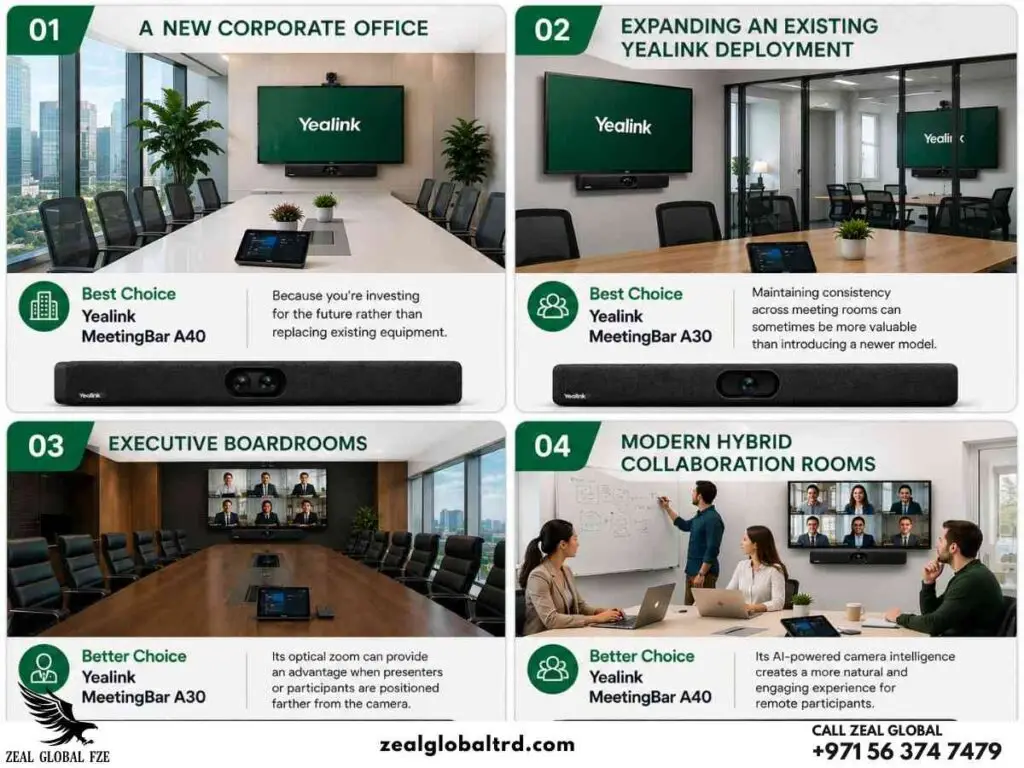
Making the Final Call
- Your room is wider than it is deep and needs ultra-wide detail.
- You’re standardising a large fleet and want the longest software runway.
- Your office has heavy glass partitioning and acoustic bleed.
- Your boardroom table is unusually long and narrow.
- You’re working with a genuinely tight budget.
- You need something with a longer, proven track record in the field.
The Multi-Room Rollout Test
What Happens When You Need 15 of These.
Buying one meeting bar is a product decision. Buying fifteen is a fleet management decision. At that scale, the A40’s newer OS reduces long-term IT overhead.
The Resale and Refresh
Because the A40 launched in late 2024, it’s likely to be in the active support window well past 2028. If your organisation runs on a 4-5 year depreciation schedule, the A40 is the safer pick for total cost of ownership.
The A30, being the earlier-generation platform, is more likely to hit its natural retirement point sooner, which isn’t a problem if you’re on a 3-year refresh cycle anyway.
Budget: What You're Really Paying For
Pricing varies by kit, standalone bar, or with touch consoles like CTP18/CTP25. The price gap is often smaller than buyers expect once touch consoles are added.
The honest budget question isn’t “which is cheaper”, it’s “which kit configuration do you actually need.” For an exact, current AED quote on the configuration that fits your room, it’s worth talking to Zeal Global’s team directly.
Tips for Management Decision
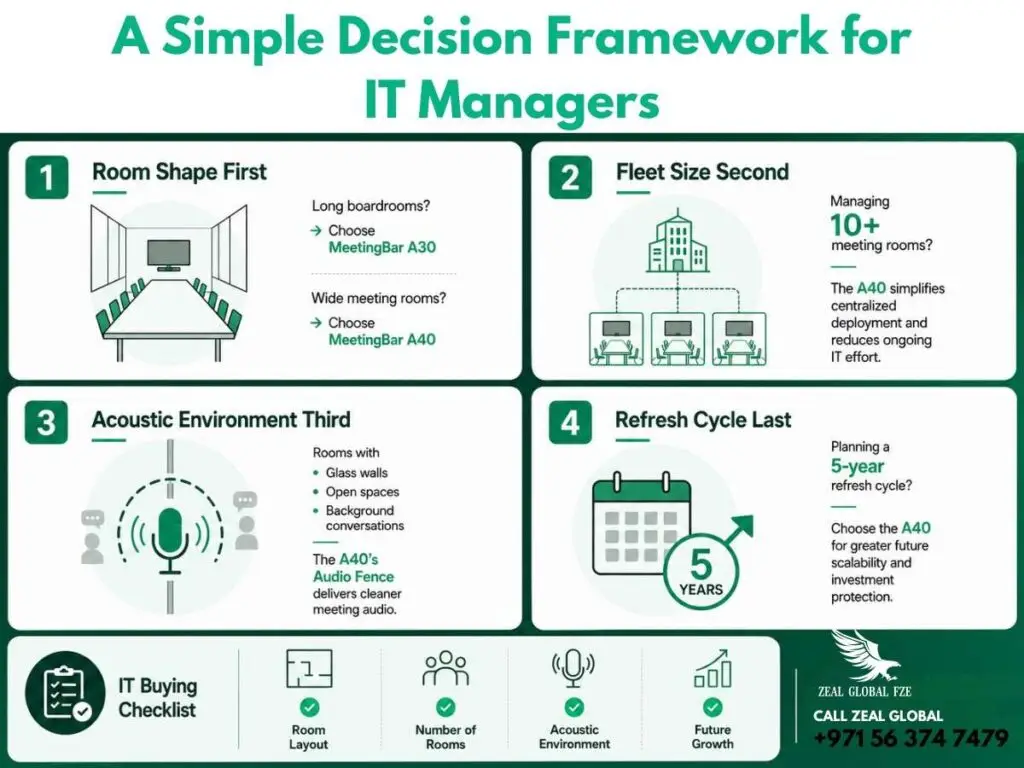
Imagine you are an operations manager at a mid-sized Dubai firm is tasked with fitting out three meeting rooms this quarter. Here’s how to decide
Room shape first: Measure before comparing specs. A long boardroom leans A30; a wide, square room leans A40.
Fleet size second: One room, either works. Ten-plus rooms, the A40’s newer OS reduces long-term IT overhead.
Acoustic environment third: Glass walls and open-plan noise bleed point toward the A40’s audio fence technology.
Refresh cycle last: A 3-year cycle makes the A30’s shorter software runway a non-issue. A 5-year cycle favors the A40.
So the decision is: A long narrow room in a 3-room, 3-year-cycle office is a straightforward A30 call. A wide room in a 15-room, 5-year-cycle rollout is just as clearly an A40 call
If We Were Buying for Our Own Office in 2026
If we were fitting out a new medium-sized meeting room at Zeal Global this year, which would we actually buy?
For a brand-new room with no existing Yealink hardware in place, we’d pick the A40 for its longer software runway and modern camera platform.
However, if we already had an A30 deployment in place, we’d stick with the A30 for consistency across the fleet.
And if the room in question is a long, narrow boardroom, the kind you find in a lot of older Dubai office towers, we’d choose the A30 regardless of what else is installed elsewhere.
When Neither Product Is the Right Choice
One of the biggest mistakes buyers make is assuming every meeting room needs the same hardware.
That’s rarely true.
You may want to reconsider both products if:
If only two or three people regularly use the room, a compact huddle-room solution may offer better value.
Installing an A30 or A40 in a tiny space could mean paying for capabilities you’ll rarely use.
For boardrooms with fifteen or more participants, or spaces with complex AV requirements, a modular video conferencing system may be a better fit.
Larger rooms often benefit from additional microphones, multiple cameras, or expandable audio systems that go beyond what an all-in-one meeting bar is designed to deliver.
If your organization requires advanced multi-camera production, integrated room control systems, or custom AV automation, it’s worth exploring enterprise-grade modular conferencing solutions instead of relying solely on an all-in-one device.
Choosing the right category of product is just as important as choosing the right model.
Yealink A40 vs A30: Pros and Cons at a Glance
| Feature | Yealink MeetingBar A40 | Yealink MeetingBar A30 |
|---|---|---|
| Biggest Strength | Latest AI platform and Android 13 | Optical zoom for long meeting rooms |
| Best For | New meeting room deployments | Existing A30 deployments |
| Camera Experience | Excellent AI framing with high-resolution sensors | Better zoom flexibility for distant participants |
| Audio Intelligence | AI Noise Cancellation Pro | Reliable AI Noise Proof |
| Software Future | Longer lifecycle | Mature but older platform |
| Ease of Use | Excellent | Excellent |
| IT Management | Easier long-term management | Familiar platform for existing users |
| Overall Recommendation | ★★★★★ | ★★★★☆ |
Ready to Choose?
If you’re still confused, that’s normal, this is genuinely a close call for most rooms. The short version: choose the A40 if your room is wide, your rollout is large, or your acoustic environment is noisy and glass-heavy. Choose the A30 if your room is long and narrow, your budget favors a proven platform, or you’re on a shorter refresh cycle where a longer software runway isn’t a priority.
Rely on Zeal Global, your trusted Yealink distributor in Dubai, for expert guidance on choosing the right meeting room technology for your business. As a leading provider of video conferencing solutions, we help you choose the best product before you commit. With years of hands-on AV experience and deep product knowledge, we provide genuine guidance.
FAQ
They target similar room sizes, but the A40 is built around a different camera philosophy (resolution-first) and a newer software base.
In most cases, yes, both use similar mounting and PoE/network cabling, so a swap doesn’t usually require re-running cables. Confirm with your installer before assuming, since display and mount positioning can differ slightly.
Both support BYOD over USB-C. The A40’s newer USB-C implementation with power delivery through the CTP25 console makes it marginally more convenient for laptop-heavy BYOD rooms.
No. Both run Teams Rooms and Zoom Rooms natively on-device, no external PC required in native mode.
Not urgently. If your A30 rooms are meeting your team’s needs and you’re not opening new rooms, there’s no pressing reason to replace working hardware. The A40 makes more sense for new installs or when you’re already due for a refresh.
The A40 has an edge here purely because of its newer Android platform, it’s likely to stay on Yealink’s active firmware and security update track for longer, which means less manual intervention over a multi-year deployment.