

What Is SIP Calling? How SIP Works and Why Businesses Use It
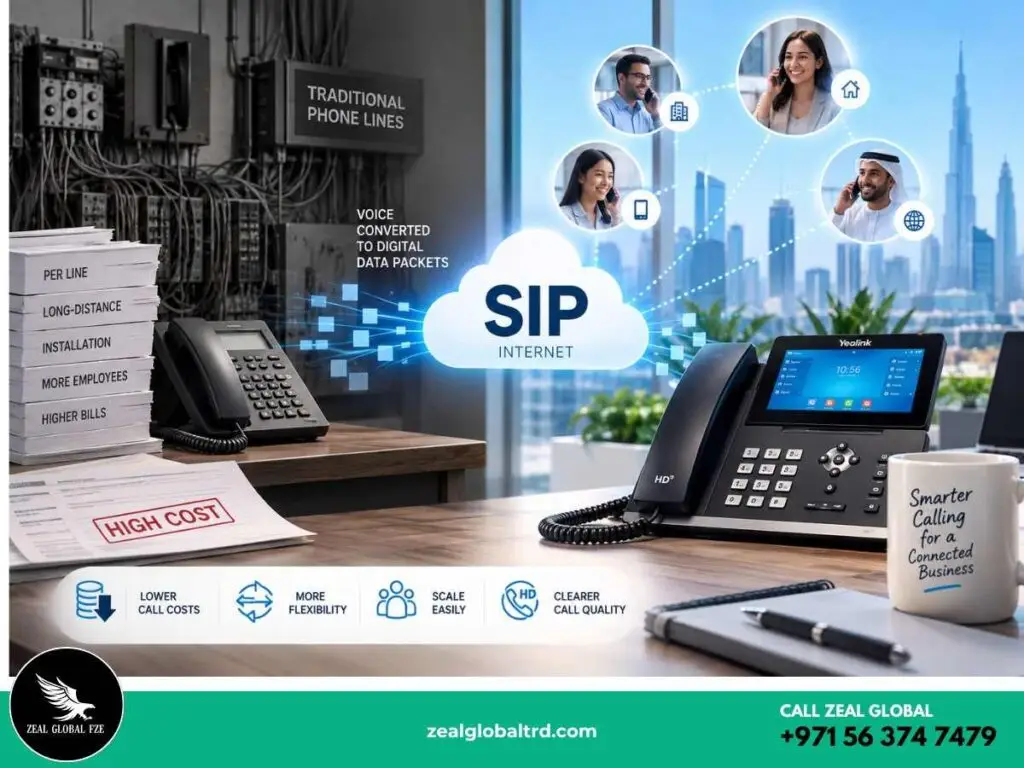
Your office phones work. Calls go through. People answer. So why change anything?
SIP calling is changing how businesses think about their phone systems. Instead of relying entirely on traditional phone lines, businesses can use internet-based communication to make and manage calls with more flexibility.
Here’s the thing, most businesses don’t realize how much they are overpaying for phone systems that were designed decades ago. Traditional phone lines charge per line, per minute for long-distance, and per installation when you add a new employee. Scale that across an office of 20 or 50 people, and the bill adds up quickly.
And the shift toward SIP isn’t just hype. According to a 2026 report by Research and Markets, the global SIP trunking services market is valued at over USD 18 billion in 2026 and is growing at roughly 12% year over year.
What Is SIP Calling?
SIP stands for Session Initiation Protocol. That sounds technical, but the idea behind it is simple.
Think of SIP as the traffic controller for a phone call.
It helps answer questions such as:
- Who is calling?
- Who should receive the call?
- Where is the recipient’s device?
- Can both devices communicate using compatible media settings?
- When should the call begin?
- When has the call ended?
The actual voice media is handled separately using other technologies and protocols. Imagine SIP as the set of instructions using the internet instead of copper phone lines.
With a traditional phone, your voice travels as an electrical signal through physical wires. With SIP, your voice is converted into digital data packets, sent over the internet, and reassembled on the other end. The person you’re calling hears you just the same, often even clearer, because SIP supports wideband (HD) audio.
Here’s a plain way to think about it: SIP is to phone calls what email was to postal mail. Same purpose, different delivery method, dramatically lower cost.
A SIP phone, like the Yealink T57W or Yealink T73U, looks and works like a regular desk phone. You pick it up, dial a number, and talk. The difference is happening behind the scenes: instead of connecting through a phone exchange, your call travels over your office internet connection
SIP, VoIP, SIP Trunking - Clearing Up the Confusion
These three terms get used interchangeably, but they’re not the same thing. And the mix-up causes a lot of buying confusion, so let’s sort it out.
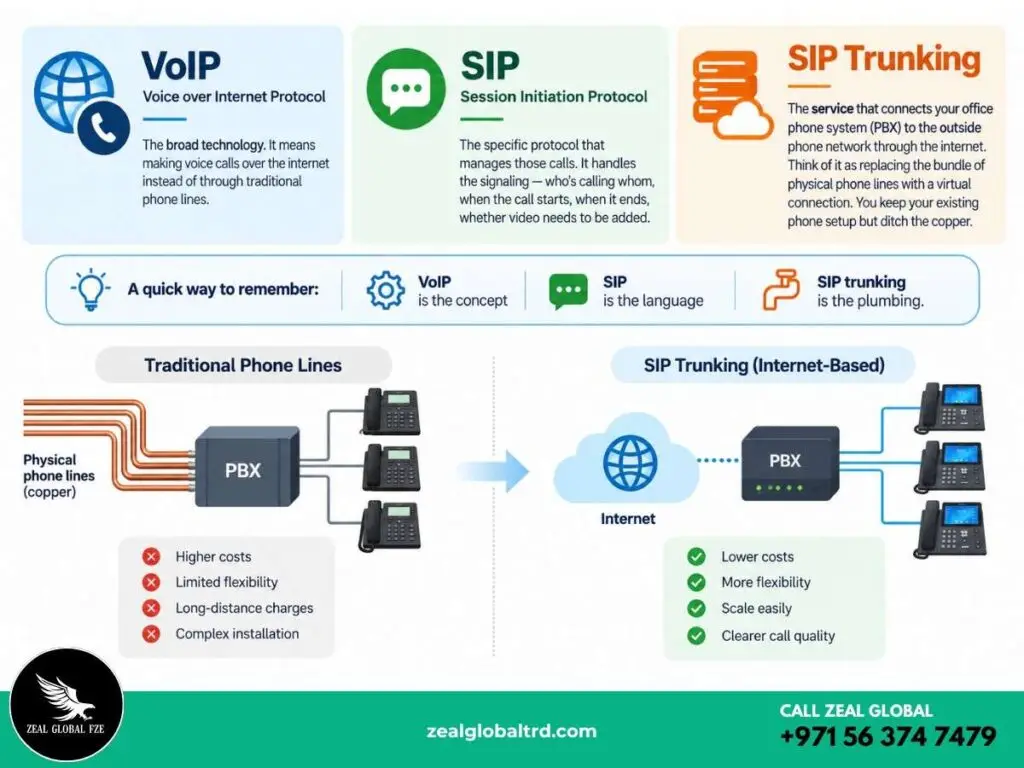
VoIP (Voice over Internet Protocol) is the broad technology. It simply means making voice calls over the internet instead of through phone lines. Every SIP call is a VoIP call, but not every VoIP call uses SIP.
SIP (Session Initiation Protocol) is the specific protocol that manages those calls. It handles the signaling, who’s calling whom, when the call starts, when it ends, whether video needs to be added. SIP doesn’t carry the voice data itself. It just manages the session.
SIP Trunking is the service that connects your office phone system (PBX) to the outside phone network through the internet. Think of it as replacing the bundle of physical phone lines coming into your office with a virtual connection. You keep your existing phone setup but ditch the copper.
How a SIP Call Happens Step by Step
When you pick up a SIP phone and dial a number, here’s what happens in the background, in about two seconds:
Here’s where SIP becomes much easier to understand.
Imagine an employee at your Dubai office calls a customer using a SIP phone.
1. The phone identifies itself
The SIP phone or softphone registers with the communication system so the network knows where that user can currently be reached.
SIP includes a registration mechanism that allows a user’s current location to be communicated to the relevant server.
2. The call request is sent
The employee dials the customer’s number.
The system sends a SIP request to establish the communication session.
3. The call is routed
SIP servers, such as proxy or registrar servers, can help locate the destination and route the request to the appropriate endpoint.
4. The devices agree on the session
Before the conversation starts, the endpoints exchange information about the session, including the media capabilities they can support.
This is where the system determines how the audio or other media should be handled.
5. The conversation begins
Once the session is established, the voice media can flow between the endpoints.
6. The call ends
When either person hangs up, SIP signalling is used to terminate the session.
The whole process can happen in seconds.
The Building Blocks Behind Every SIP Call
User Agent (Your Phone or App)
This is any device that can make or receive SIP calls. It could be a physical desk phone like the Yealink T48U, a mobile app, or a softphone running on your laptop. The user agent is what you actually interact with.
SIP Proxy Server
Think of this as the traffic controller. When you make a call, the proxy server figures out where the call needs to go, checks permissions, and forwards the request.
Instead of every phone operating independently, the IP-PBX gives the business a central communication system.
Registrar Server
This keeps track of where every user is. When your SIP phone boots up, it “registers” with this server, essentially saying, “I’m at this IP address, send calls here.” That’s how the network knows which device to ring.
SIP Gateway
This is the bridge between SIP and the traditional phone network. If someone on a SIP phone calls a regular landline or mobile number, the gateway translates the call so both sides can communicate normally.
Internet or IP network
The network provides the underlying connectivity for the communication system.
That means your SIP setup needs more than just SIP-compatible phones. Network quality, configuration and security also matter.
Codec
The codec compresses your voice into digital data and decompresses it on the other end. Common ones include G.711 (high quality, more bandwidth) and G.729 (lower bandwidth, slightly compressed). The codec you use affects call quality and how much internet bandwidth each call consumes.
Most of this infrastructure is managed by your SIP provider or your IT team. As an end user, all you experience is a phone that works, but knowing what’s behind it helps when you’re evaluating solutions.
Why Businesses Are Moving to SIP ?
Here’s what actually changes when a business switches:
Your phone bill drops significantly
Businesses migrating from traditional PRI lines to SIP typically save between 25% and 65% on monthly telecom costs, according to a 2026 analysis by SIPTrunk.com.
Long-distance and international call charges shrink because voice travels over the internet instead of metered phone lines. For a company in Dubai with clients across India, Africa, and Europe, that adds up fast.
Adding a new employee doesn’t require a technician
With traditional lines, adding a phone means installing physical wiring and provisioning a new line through your telecom provider.
With SIP, it’s a configuration change. Plug in a new SIP phone, assign an extension, done. This matters when you’re hiring five people in a month and don’t want to wait three weeks for wiring.
Remote and hybrid teams stay on the same system
A SIP phone isn’t tied to a physical location. An employee working from home, a branch office in Sharjah, or a temporary project site in Abu Dhabi can all use the same phone system.
Their desk phone or softphone connects through the internet, and incoming calls route to them wherever they are.
Call quality is better than most landlines.
SIP supports HD voice (wideband audio) with a wider frequency range than traditional phone lines. Conversations sound clearer, with less of that compressed, tinny quality you get on older phone systems.
You don’t have to rip out your existing setup
SIP trunking connects to your current PBX. So if you’ve already invested in a phone system, you’re not starting from scratch you’re replacing the phone lines feeding into it.
One thing to be honest about: SIP depends on your internet connection. If your office has unreliable internet or limited bandwidth, call quality will suffer. That’s not a flaw in SIP it’s an infrastructure requirement you need to address before switching.
Most modern offices in the UAE, especially in Dubai and Abu Dhabi, have internet speeds that handle SIP easily. But it’s worth verifying with your ISP.
Where Does SIP Fit Into Customer Service?
Consider a customer calling a company about an order.
With a basic phone setup, the receptionist might answer, ask what the customer needs, put them on hold, find the right employee and transfer the call.
A SIP-based business phone system can automate much of this process.
For example:
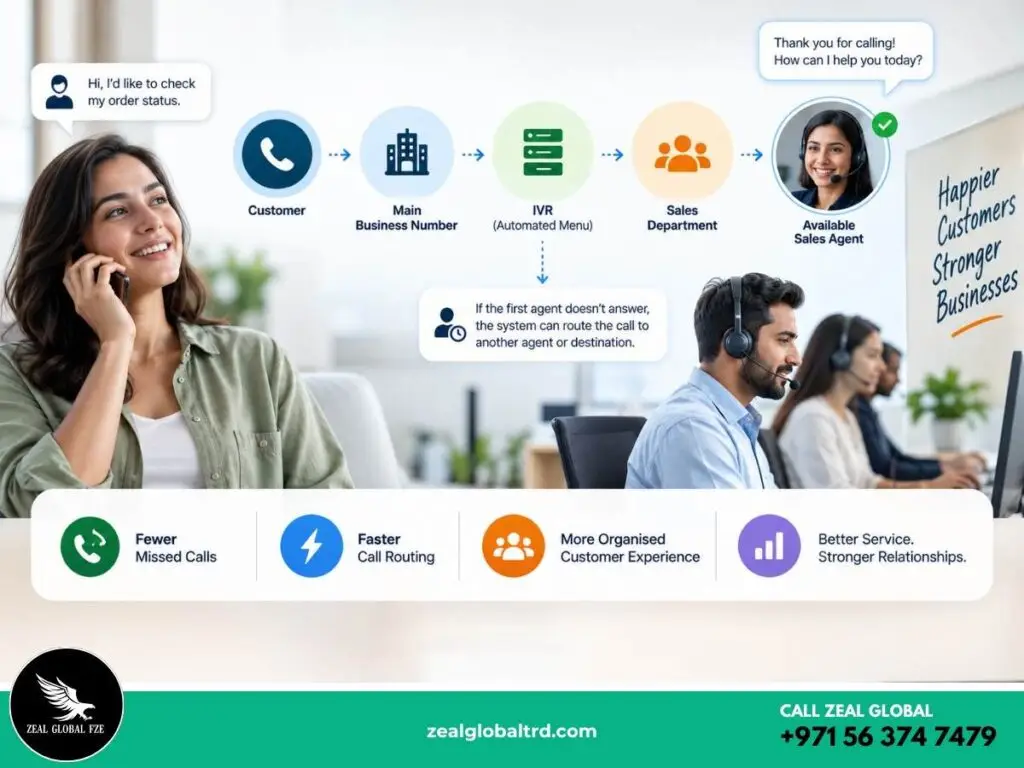
If the first agent doesn’t answer, the system can potentially route the call to another employee or destination, depending on the configuration.
For contact centres and customer-service teams, SIP infrastructure can also connect cloud communication platforms with PSTN services.
The result isn’t simply “cheaper calling.”
It can mean fewer missed calls, faster routing and a more organised customer experience.
Which Businesses Benefit Most from SIP?
SIP calling isn’t limited to one industry. But some use cases see the biggest return:
Multi-location companies with offices across different Emirates or countries. SIP lets all locations share one phone system, with internal calls between sites costing nothing.
Small and medium businesses
SMBs can use SIP phones and IP-PBX systems to create professional phone systems without building a large traditional telecom infrastructure.
Corporate offices
Larger organisations can use SIP for extensions, departments, multiple locations and centralised communication management.
Contact centres
High call volumes make flexible routing and scalable connectivity particularly valuable.
Healthcare and professional services
Reception desks, departments and teams that handle frequent inbound calls can benefit from structured call routing.
A Quick Note on SIP Calling in the UAE
The UAE has a specific regulatory environment when it comes to internet-based calling. Consumer VoIP apps (like Skype or WhatsApp calling) have historically been restricted.
However, business SIP and VoIP services operate on a different track. Companies can deploy SIP trunking through licensed telecom operators Etisalat (e&) and du or through approved solutions that connect via their infrastructure. Licensed SIP trunking for business use is fully legitimate and widely adopted across the UAE.
If your business is based in Dubai, Abu Dhabi, Sharjah, or elsewhere in the Emirates, you can absolutely use SIP phones as part of your office communication system. The key is working with the right hardware and a compliant SIP trunk provider.
This is also one reason why dedicated SIP desk phones like those from Yealink are preferred over softphone-only setups in the UAE.
A physical SIP phone connected through your business network and a licensed trunk provider gives you a compliant, reliable communication system without ambiguity.
Is SIP Better Than a Traditional Phone?
There isn’t a universal yes or no.
It depends on what your business needs. Lets see the comparison.
| SIP-Based Phone System | Traditional Phone System |
|---|---|
| Uses IP networks | Typically relies on traditional telecom infrastructure |
| Easier to scale in many deployments | Expansion can involve additional physical infrastructure |
| Supports remote and distributed users | Often more closely tied to physical locations |
| Can integrate with IP-PBX and business applications | Usually has fewer native software integrations |
| Can support advanced call-routing workflows | Feature availability depends on the phone system |
| May reduce infrastructure and calling costs | Pricing structure depends on carrier and service |
The important point is that SIP isn’t automatically cheaper or better in every situation.
Your provider, call volume, network, existing infrastructure and required features all affect the final outcome.
So, Is SIP Calling Right for Your Business?
If your business is still running on traditional phone lines, or you’re setting up a new office and evaluating options, SIP is worth a serious look. The cost savings are real, the call quality is better, and the flexibility to scale without infrastructure headaches makes it a practical fit for growing businesses in the UAE.
At Zeal Global, we work with businesses across the UAE, Middle East, and Africa to set up reliable communication systems. We supply Yealink SIP phones from entry-level models to advanced touchscreen handsets and can help you figure out which model fits your office, your team size, and your workflow.
Not sure where to start? Reach out to our team on WhatsApp and tell us about your setup. We’ll point you in the right direction, no pressure, just practical advice.